
Google Shopping and Meta reject products without an image, and a rejected product can drag down the whole account. A rule removes them before any channel sees them.
- Open the data source, go to Rules and create a new rule - name it, for example, “No image - exclude”.
- Under Conditions pick image_link and the operator Is empty.
- Under then choose All fields & exclude in the field list.
- Click Changes preview to see which products will leave the feed, then Save Rule.
Example
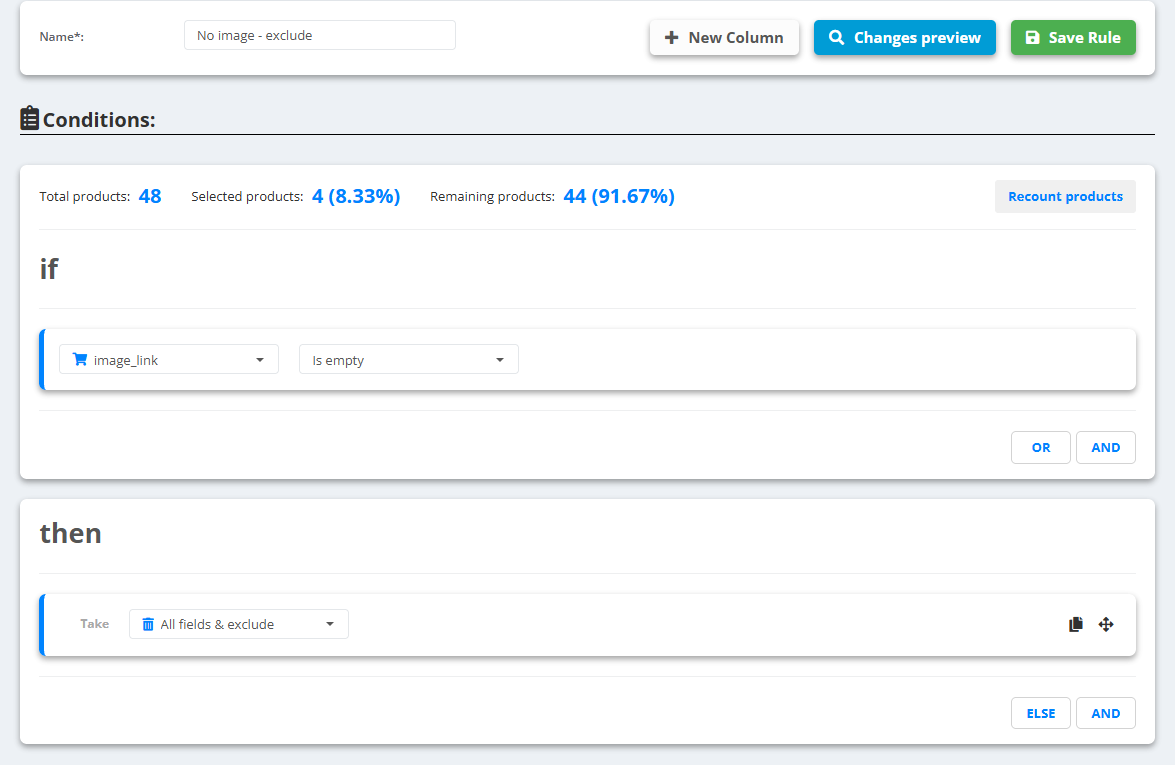
- A catalog of 48 products, 4 of them with an empty
image_link- the rule selects exactly those 4 (8.33%). - After the next update every feed of this data source has the other 44.
Want them out of one channel only? Use a condition in that export instead: image_link Is not empty - see Create a feed export.