
AI Optimizer module
Two ways to put AI on your feed.
AI-Powered Rules: you write the instruction and the AI fills one field for every product - or it looks at every product picture and tags it. AI-Optimized Feed: switch on what to improve and get a Google-ready copy of the whole catalog, with a quality score. One module, one price.
- We set everything up for you
- 30 days free
- No credit card
- No contracts · Cancel anytime
AI-Powered Rules
Your prompt → one field, filled for every product.
Prompt
AI-Optimized Feed
Whole catalog → a Google-ready copy. One product shown.
Quality score
title
cls hi grn 42
color
missing
google_product_category
missing
One module, two tools
Pick the tool for the job - or use both.
You write the instruction
AI-Powered Rules
One rule = one field: text from your prompt, or a tag for every product picture. Works inside any data source, next to your normal rules.
- Input
- Your prompt in plain language - or the product pictures
- Output
- One field of your choice: text, or one tag per picture
- Scope
- All products or a filtered set
- Best for
- Ad copy, keywords, labels, picture tags
You switch on what to improve
AI-Optimized Feed
A separate data source built from an existing one. The original stays untouched.
- Input
- Toggles: titles, descriptions, attributes, category…
- Output
- A whole new, Google-ready feed
- Scope
- The entire catalog, only changed products re-done
- Best for
- Google Shopping readiness of the whole catalog
AI-Powered Rules
Say what you want. Every product gets it.
A rule is four choices: which products, what to do, which field to write to and which fields the AI may read. Save it - the field is filled for the whole catalog and kept up to date on every feed update.
- 1Which products
- 2What to do (prompt)
- 3Output field
- 4Fields it may use
Prompt
Give 3 search terms a shopper would type to find this product, lowercase, comma-separated.
Output field search_terms
Your Brand Classic Hi - Green, EU 42
green high top sneakers, classic hi tops, canvas high tops
Asics Gel-Kayano 14 - Silver, EU 42
gel kayano 14, silver running shoes, retro asics
Vans Old Skool - Navy, EU 43
navy vans old skool, skate shoes navy, vans low top
✓ Double-check the result
If the prompt asks for a length, a number of words, lowercase or a fixed first/last word, the system counts it and asks the AI again when the answer misses.
AI image tags
Know what every product picture shows.
Set the rule type to Image tags and the AI looks at every picture in a field - usually additional_image_link - and writes one tag per link into a field you choose. Your pictures stay exactly as they are.
- ✓One tag per picture, in the same order as the links
- ✓Pictures are never changed or removed - only tagged
- ✓Later updates send only new or changed links to the AI
Cordless Drill 18 V
Pictures additional_image_link
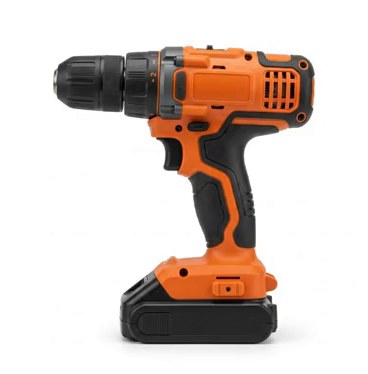
product
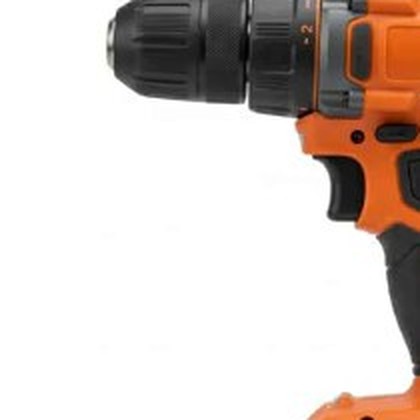
close_up
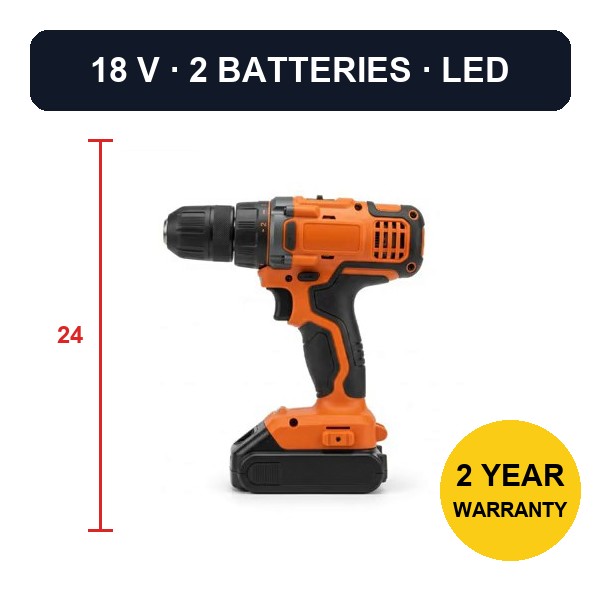
info

bad
Tags written to image_tags
- product - Whole product, plain background
- lifestyle - Product in a room or in use
- close_up - Part of the product, still a good photo
- info - Text or badges on the photo
- bad - Close-up of an unimportant spot
AI-Optimized Feed
The whole catalog, rewritten for Google.
Point it at any data source, choose what to optimize and generate a preview on a sample of your products. Then let it run over the catalog - only products that change are optimized again.
Feed Quality Score
62 → 94
A 0-100 score for required fields, recommended attributes and what the AI improved - shown before and after in the preview.
Optimize titles
Brand + product type + key attributes, within Google’s recommended length.
Optimize descriptions
Clear, keyword-relevant, no keyword stuffing.
Generate product highlights
Short bullet points for the product_highlight attribute.
Add missing attributes
GTIN/MPN, brand, color, size, material, gender, age group.
Fill Google product category
A real category from Google’s official list - never a made-up one.
Normalize attribute values
"Red" / "red" / "RED" become one value.
Translate feed content
Title, description and text attributes in the feed language you pick.
FAQ
AI Optimizer questions
Is the AI Optimizer included in the base price?
No. It is an additional module priced individually - tell us your catalog size and what you want to do, and you get a price. Both tools, AI-Powered Rules and AI-Optimized Feed, are part of the same module.
What is the difference between AI-Powered Rules and AI-Optimized Feed?
Rules: you write a prompt and the AI fills one field of your choice for every product - inside your existing data source. Optimized Feed: a separate data source that rewrites titles, descriptions, attributes and categories for the whole catalog, with a Feed Quality Score.
Does it change my original feed?
No. AI-Optimized Feed is a new data source built from the original; the original stays as it is. AI-Powered Rules write into the output field you choose.
Does it re-process everything on every update?
No. Results are cached per product. On the next update only new or changed products go to the AI - unchanged ones keep their result, while prices and stock are refreshed as usual.
What are AI image tags?
A second type of AI-Powered Rule. The AI looks at each picture in a field such as additional_image_link and writes one tag per link - product, lifestyle, close_up, info or bad - into a field you choose. Use the tags in filters and rules, for example to find products whose pictures carry text or show only a detail.
Does image tagging change or remove my pictures?
No. The rule only writes tags into its own field. The picture links stay exactly as they are, in the same order.
Do image tags cost extra?
No. They are part of the AI Optimizer module. Each picture is tagged once and remembered, so later updates only send new or changed links to the AI.
Can it invent a Google product category?
No. The AI chooses from a shortlist taken from Google’s official product taxonomy, so the category always exists.
Which languages can it translate to?
You pick the feed language in the AI-Optimized Feed settings; title, description and text attributes are translated into it.
Let the AI do the typing.
Start the 30-day trial, then tell us what you want the AI Optimizer to do - we quote the module for your catalog.
No credit card · No contracts · Setup included · 30 days free