
Free Shopping Ads audit
Your Shopping Ads, scored. And what to fix first.
Connect Google Ads - and Merchant Center if you want your prices checked against the market. In about three minutes you get a 0-100 score, the money going to waste and the five fixes that pay the most. Free, no account needed.
Free · Reads your data, changes nothing · Access removed after 24 hours
Shopping Ads audit
yourstore.com ·
Last 90 days
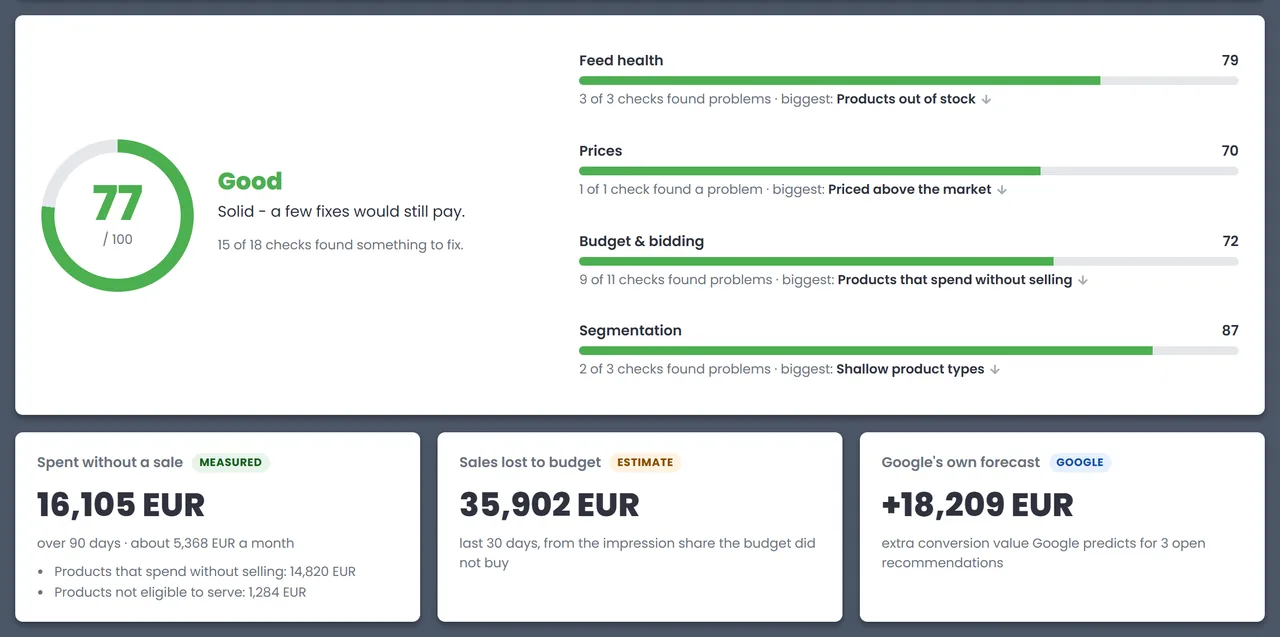
Good · Solid - a few fixes would still pay.
Fix these first
- 1Products that spend without selling14,820 EUR spent
- 2Priced above the market182 products
- 3Campaigns limited by budget-28.6% impressions
What it checks
18 checks in four areas.
Feed health
Products Google will not show, products out of stock and titles too short to match searches or too long to read.
- Not eligible to serve
- Out of stock
- Titles too short or too long
Prices
With Merchant Center connected: your price against the market price, product by product, and how ad spend splits by price position.
- Priced above the market
- Spend by price position
- Cheaper than the market
Budget & bidding
Where the money goes: products that spend without selling, campaigns that run out of budget, Smart Bidding without enough data, and products no campaign advertises.
- Spend without selling
- Limited by budget
- Lost to ad rank
- PMax and Shopping overlap
- Not in any campaign
- No impressions
- No conversion tracking
Segmentation
The handles you need to bid differently on winners and losers - custom labels, deep product types and brands.
- Custom labels unused
- Shallow product types
- Products without a brand
The report
A score, the money, and the order to fix things in.
Every finding comes with the products or campaigns behind it, what to do about it and how much work it is.
- A 0-100 score - for the account and for each of the four areas, so you see at a glance where it hurts.
- The money - spent on products that never sold, and the sales lost because the budget ran out - in your currency.
- Fix these first - the five findings that pay the most, ranked, each marked a quick fix or some work.
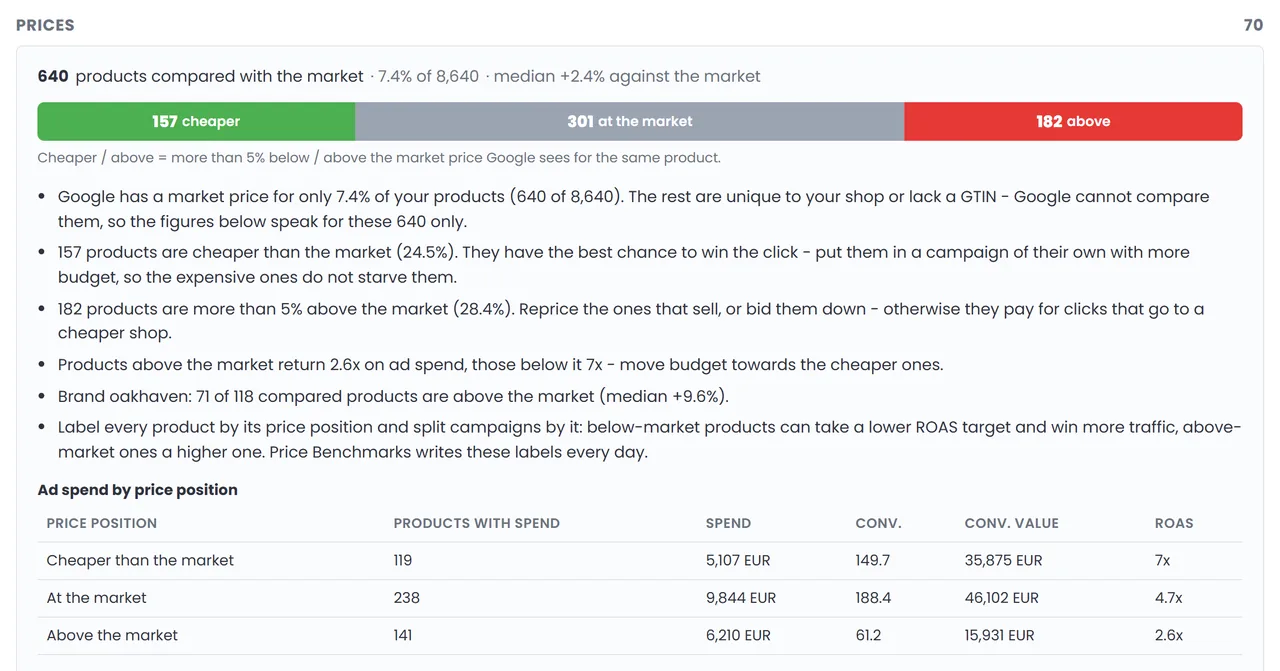
Prices, with Merchant Center
See which products are priced above the market.
Connect Merchant Center as an optional step - we find the one your Google Ads account is linked to, you only sign in. The report then compares your prices with the market price Google sees for the same product.
- Cheaper, at the market, above - how many of your products sit where - and which ones.
- Spend by price position - ROAS for products below, at and above the market, so budget can follow the winners.
- By brand - which brands are priced above the market most often.
How it works
Four steps. About three minutes.
Connect Google Ads
Sign in with Google. The audit only reads your data - nothing in the account is changed.
Pick account and period
Any account you can access, over the last 30, 90 or 180 days.
Add Merchant Center
Optional - for the price comparison with the market. Skip it and everything else still runs.
Read the report
Score, money and fixes in about three minutes. Print it or save it as a PDF.
FAQ
Audit questions
Is it really free?
Yes. No PPCDATAFEED account, no card, no obligation. Connect Google Ads, pick the account, get the report.
Does it change anything in my account?
No. The audit only reads. Google asks for full Google Ads permission because the Google Ads API has no read-only option - nothing is ever changed. The connection is kept for 24 hours, so you can run several audits, and is deleted after that or as soon as you sign out.
Do I need Merchant Center?
No. Everything except the price comparison comes from Google Ads. Connect Merchant Center if you want to see your prices against the market - we find the one linked to your Google Ads account.
Which period does it analyze?
The last 30, 90 or 180 days - 90 by default. Impression share for campaigns is always the last 30 days.
How is the score calculated?
Each of the 18 checks can take points off its area - feed health, prices, budget & bidding or segmentation - depending on how much of the account it affects. The areas add up to the 0-100 score. An area without data, such as prices without Merchant Center, is left out instead of counted as zero.
Can I see a report before connecting my account?
Yes - the example report shows a made-up shop checked exactly the way your account would be.
And after the audit?
Fix the findings yourself, or let PPCDATAFEED do it: feed rules, labels, price benchmarks and budgets from the same catalog. Book a free demo call - we set it up with you, then the first 30 days are free.
Know what to fix before you spend another euro.
Free, about three minutes, changes nothing in your account.
Run your free audit →