
After then you pick the field to change and one of these actions. The groups are the same as in the rule editor: Text, Math and List.
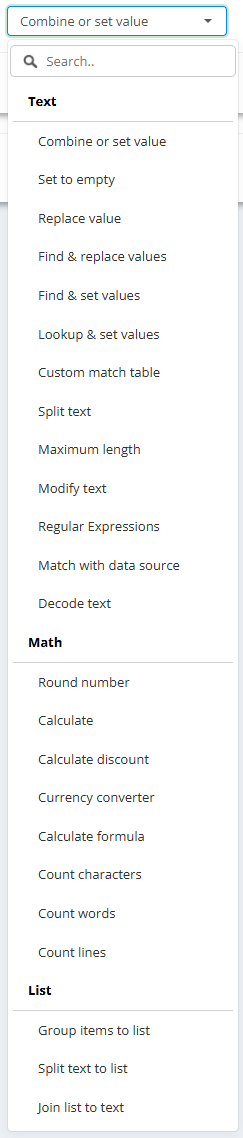
Text
- Combine or set value - writes typed text, values of other fields, or both joined together (for example brand, a space and title).
- Set to empty - empties the field; it stays in the feed with no value.
- Replace value - replaces every place one text appears in the field with another; both can be typed or built from fields. Capital letters do not matter.
- Find & replace values - many replacements at once: one text per line on the left, its replacement on the same line on the right. Example: find and replace words in titles.
- Find & set values - when the field contains a text from the left list, the whole field becomes the value on the same line on the right (for example any title containing “sneaker” → category “Shoes”).
- Lookup & set values - a lookup table: when the whole field equals a value from the left list, it becomes the value on the right.
- Custom match table - looks at another field: when it equals (or contains) a value from the list, this field gets the value on the same line.
- Split text - takes some parts of a field split by a separator (for example the last part of “Shoes > Women > Sneakers” split by “>”); positions from the start or the end; parts can be joined back with a separator. Example: product_type from the category path.
- Maximum length - cuts the field to at most N characters: Trim on characters (exactly) or Trim on words (without breaking a word).
- Modify text - case and cleaning: Capitalize only first character, Capitalize first character per word, Smart title case (words in ALL CAPS become normal case, codes and model numbers stay), Lowercase all words, Uppercase all words, Remove line breaks, Remove whitespaces (repeated spaces become one), Remove seller codes (seller reference numbers such as #BGG7 or [48909075] out of titles; quantities such as “250 Million” stay), HTML to Plain Text.
- Regular Expressions - sets the field to the part a regular expression captures; several expressions can be added, the first one that matches is used. Capital letters matter:
XLdoes not matchxl. Example: size from the title. - Match with data source - finds the same product in another data source by a matching field and copies a field from there (like VLOOKUP between two feeds). Example: stock from a supplier file.
- Decode text - takes one value out of a field that holds JSON, by its key path (for example
['size']['eu']).
Math
- Round number - rounds to N decimal places.
- Calculate - one operation: plus, minus, multiply by, divide by - a number or another field (for example price multiply by 1.2). A field with several values (one per line) is calculated line by line.
- Calculate discount - discount % from a price field and a sale price field: (price - sale price) / price × 100, 0-2 decimals; left empty when there is no real discount.
- Currency converter - converts a price field from one currency to another; rate source Lithuanian Bank (default) or Stripe; the rate of the moment the data source updates; Check rate shows the rate that will be used.
- Calculate formula - a whole calculation with brackets, fields and numbers, for example
( price * 1.10 + 50 ) / sale_price * 100; left empty when it cannot be calculated (never 0). - Count characters - how many characters another field has (like LEN in Excel).
- Count words - how many words.
- Count lines - how many non-empty lines (for example how many images).
List
- Group items to list - several fields into one field as a list, one per line (for example several image fields into additional images).
- Split text to list - splits a field by a separator into a list, one item per line.
- Join list to text - joins a list into one text with a separator.
Leaving products out
- All fields & exclude - removes the matching products from the feed entirely. It is a choice in the field list of the then part, not an action. Example: products without an image.