
- Go to API Connections (the screen is Marketplace API Connections) → Create New API Connection → Google Shopping.
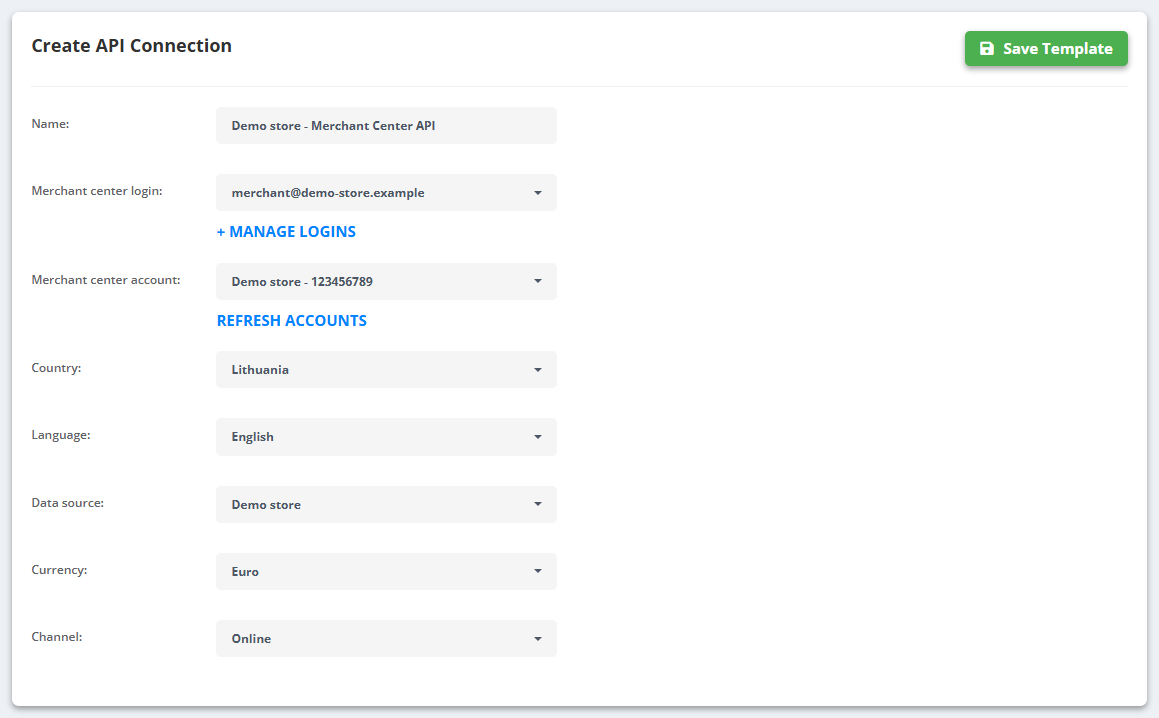
- In Settings enter a Name:, pick the Merchant center login: (+ MANAGE LOGINS to add one) and the Merchant center account: (REFRESH ACCOUNTS if the list is empty), then the Country:, Language:, Data source:, Currency: and Channel:.
- In Build (“Build product listings for Google Shopping”) map the fields under Fields Mapping - Required, Shipping, Optional and Custom label - and click Save Template.
- Set the Schedule. Each run shows the number of updated and deleted products in Last Sync Changes.
The list
- Every connection shows its Name, Data source, Type, Total Products, Last Sync Changes and Synced at - with Not Synced, Synchronizing..., Sync Failed or Error... when it is not up to date.
- Manage opens Settings, Build, Remove Uploaded Products and Delete.
Remove Uploaded Products takes everything this connection sent out of Merchant Center again.
Most accounts do fine with a Google Shopping feed export fetched by Merchant Center; use the API connection when you need near-real-time updates of stock and prices.