
By default an XML export is a Google-style feed: one <item> per product inside <rss><channel>, every field with the g: prefix, every value wrapped in CDATA. A product mapped with three fields looks like this:
<rss xmlns:g="http://base.google.com/ns/1.0" version="2.0">
  <channel>
    <item>
      <g:id><![CDATA[SKU-1042]]></g:id>
      <g:title><![CDATA[Puma RS-X3 Women's Sneakers]]></g:title>
      <g:price><![CDATA[119.99 EUR]]></g:price>
    </item>
  </channel>
</rss>
Everything below changes that shape. All of it applies to XML exports only - a CSV export is simply one column per mapped field.
Field names: what you can type
- The name you enter in Mapping becomes the element name. It must be a valid XML name: letters, digits,
_,-and.; it cannot start with a digit or contain<,>,&or quotes. Saving an export with a bad name fails with Invalid tag names: …. - Spaces inside a name are turned into underscores in the file:
Product Typeis written as<Product_Type>. - With the Prefix "G:" namespace setting on (the default) every element gets
g:- you never type the prefix yourself.
Nested elements: parent >> child
Put >> (space, two greater-than signs, space) between names to create a level. The value goes into the innermost element; elements with the same parent are grouped under it automatically.

Two mapping rows named shipping >> country = LT and shipping >> price = 3.99 EUR produce:
<g:shipping>
  <g:country><![CDATA[LT]]></g:country>
  <g:price><![CDATA[3.99 EUR]]></g:price>
</g:shipping>
Levels are not limited - product_detail >> attribute >> value gives three. This is how Google's shipping, tax, product_detail or installment groups, and any custom channel structure, are written.
Several values in one field → repeated elements
When a value contains line breaks (one value per line), the writer outputs the element once per line. That is the way to get repeated elements such as several additional images:
A field additional_image_link whose value is three URLs on three lines becomes:
<g:additional_image_link><![CDATA[https://shop.com/img/1042-back.jpg]]></g:additional_image_link>
<g:additional_image_link><![CDATA[https://shop.com/img/1042-side.jpg]]></g:additional_image_link>
<g:additional_image_link><![CDATA[https://shop.com/img/1042-sole.jpg]]></g:additional_image_link>
Multi-line values come from the source (a column that already lists several images) or from a rule that combines fields with a line break as the separator. Empty lines are dropped.
The opposite case - a description that contains paragraphs and must stay one element - is the Keep lines under one field setting below.
Variant settings: repeated elements with an attribute and children
The gear icon at the end of a mapping row opens Variant settings. Switch it on when a field holds one value per line and other fields hold matching values line by line - sizes with a price and a stock for each size, colours with an image for each colour. The writer then outputs the element once per line, puts the line's value into an attribute, and nests the matching lines of the other fields as children.
- Attribute name (Optional) - the attribute that receives the main field's value on each repetition (
id,name,code…). Leave it empty to get the repeated element without an attribute. - + Add Variant Field - a child element per row: the field name to write and the data field to take the values from. Line 1 of every variant field goes into repetition 1, line 2 into repetition 2, and so on.
- Type
_NO_ELEMENT_NAME_as a variant field name to write that field's value as the text of the repeated element itself, without a child tag.
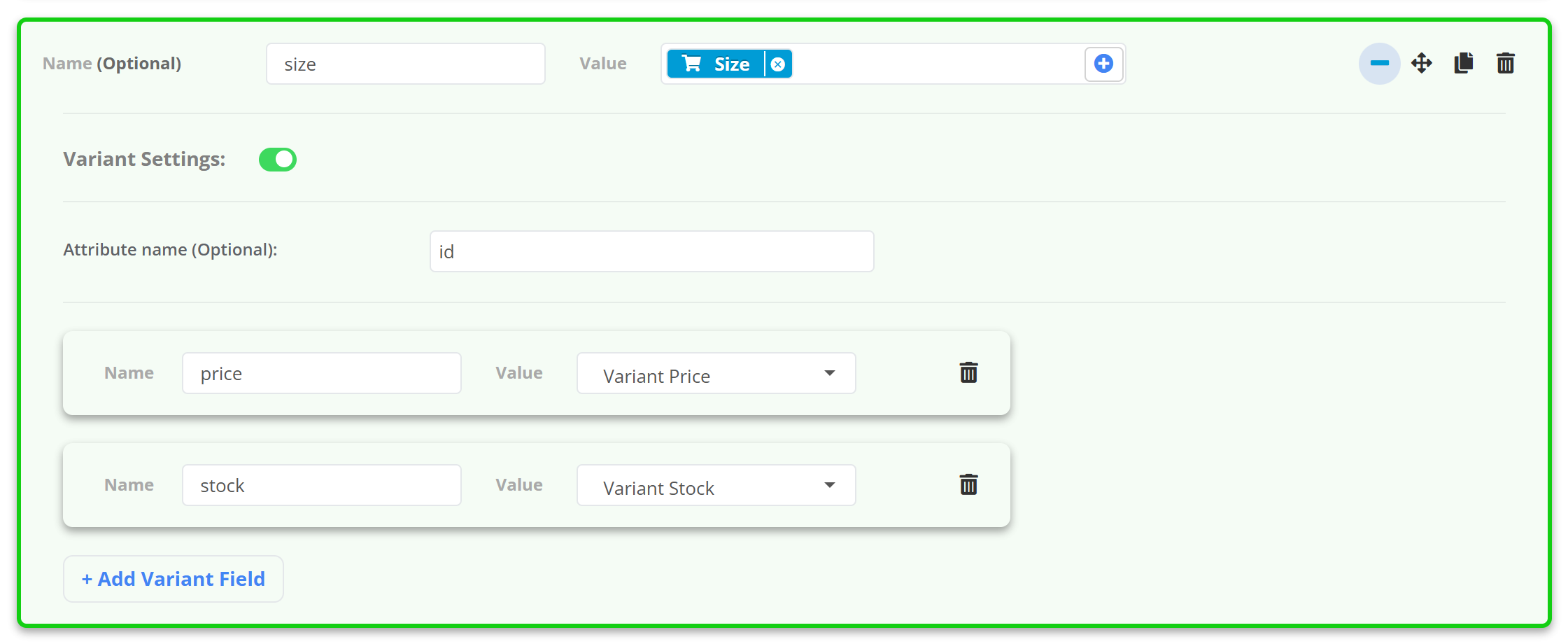
Example - mapping row size with the value S, M, L on three lines, attribute name id, variant fields price (from a field holding 19.99, 19.99, 21.99) and stock (from in stock, in stock, out of stock), prefix off:
<size id="S">
  <price>19.99</price>
  <stock>in stock</stock>
</size>
<size id="M">
  <price>19.99</price>
  <stock>in stock</stock>
</size>
<size id="L">
  <price>21.99</price>
  <stock>out of stock</stock>
</size>
The same rows with _NO_ELEMENT_NAME_ instead of price and no attribute name:
<size><![CDATA[19.99]]><stock>in stock</stock></size>
<size><![CDATA[19.99]]><stock>in stock</stock></size>
<size><![CDATA[21.99]]><stock>out of stock</stock></size>
Variant settings repeat elements inside one product. One product row in the data source is always one <item> - variants that are separate rows in your source stay separate items.More Settings
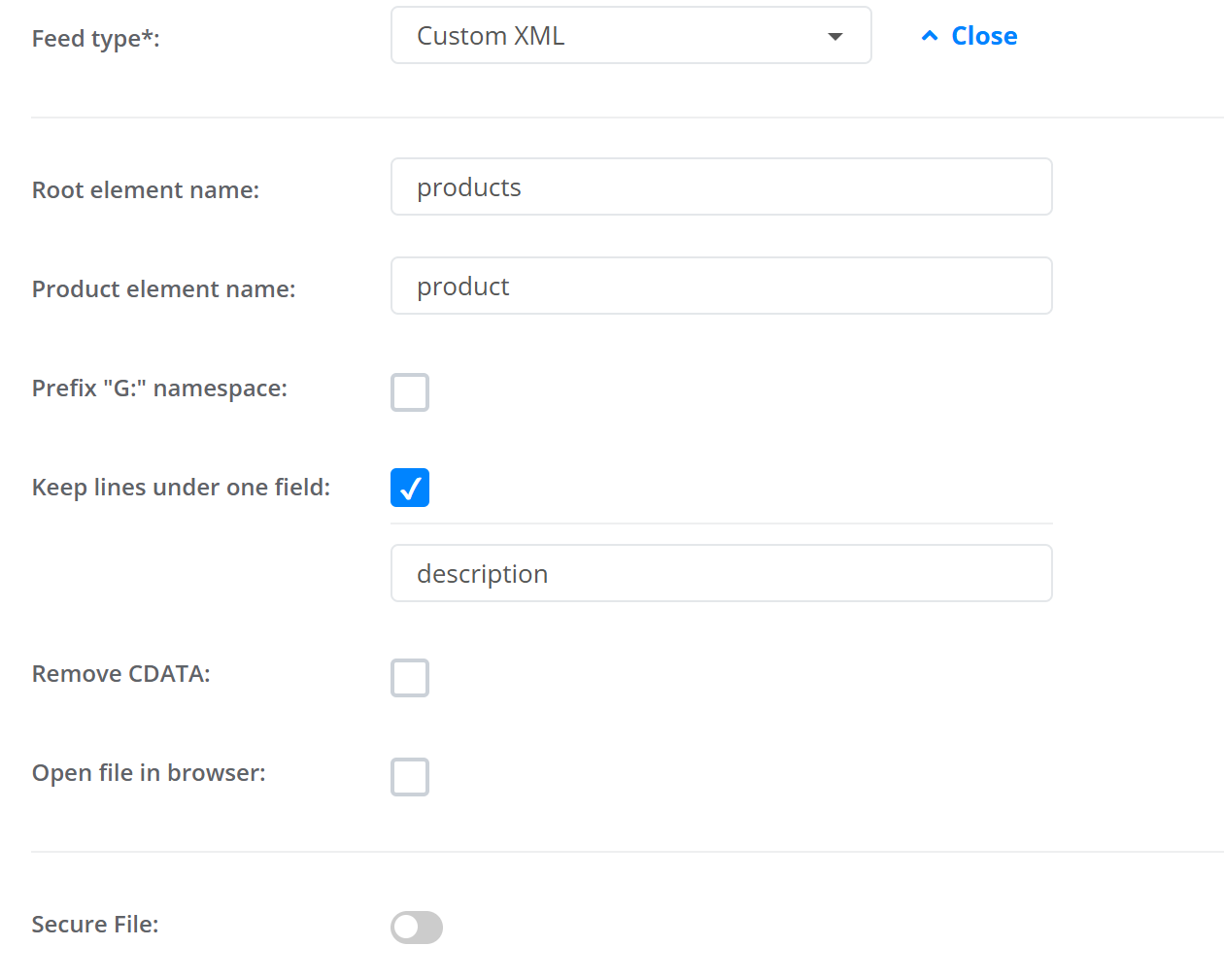
The More Settings link under the feed type opens the file-level options. They apply to the whole export.
Root element name and Product element name
The wrapper names, channel and item by default. A channel that wants <products><product> gets it with products / product and the prefix switched off (with the prefix on, the root still sits inside <rss>):
<products>
  <product>
    <id><![CDATA[SKU-1042]]></id>
    <title><![CDATA[Puma RS-X3 Women's Sneakers]]></title>
  </product>
</products>
Prefix "G:" namespace
On: the file starts with <rss xmlns:g="http://base.google.com/ns/1.0" version="2.0"> and every element is g:name - what Google Merchant Center, Meta and most Google-style channels expect. Off: no <rss> wrapper, no prefix, plain names - use it for any channel that gives you its own XML specification (price comparison sites, marketplaces).
Keep lines under one field
Lists the field names whose line breaks must stay inside one element instead of producing repeated elements. Typical use: description with several paragraphs.
<g:description><![CDATA[Lightweight retro runner.
Suede and mesh upper.
Rubber outsole.]]></g:description>
Remove CDATA
Writes values as plain text instead of <![CDATA[…]]>. Some channels reject CDATA; Google accepts both. With CDATA off nothing is escaped, so a value containing & or < will break the file - keep it on unless the channel insists.
<g:title>Puma RS-X3 Women's Sneakers</g:title>Open file in browser
Serves the file so a browser displays it in the tab instead of downloading it - handy for checking the output; channels do not care either way.
Secure File
Protects the feed URL with a Username and Password (HTTP authentication). Merchant Center and Meta can fetch password-protected feeds; enter the same credentials there.
Checking the result
- File Preview on the export screen shows the first 100 products exactly as written, with all of the above applied.
- After Save Template the full file is generated; open the Feed URL in a browser (with *Open file in browser* on) to read it.
- Element order follows the order of the mapping rows - drag rows to reorder.