
Every feed export has its own conditions, so one data source can feed Google with everything and a marketplace or Meta campaign with one brand or category only.
- Go to Feed Exports and open (or create) the export for that channel.
- Under Conditions click + Add Condition, pick brand, the operator Contains any and type the brands separated by
||, for exampleNorthpeak || Velora. For a category, pick the category field and Contains, for exampleGarden. - Click CONDITIONS PREVIEW - Filtered products shows how many products stay.
- Click Save Template. The export URL stays the same - the channel gets only the products that match.
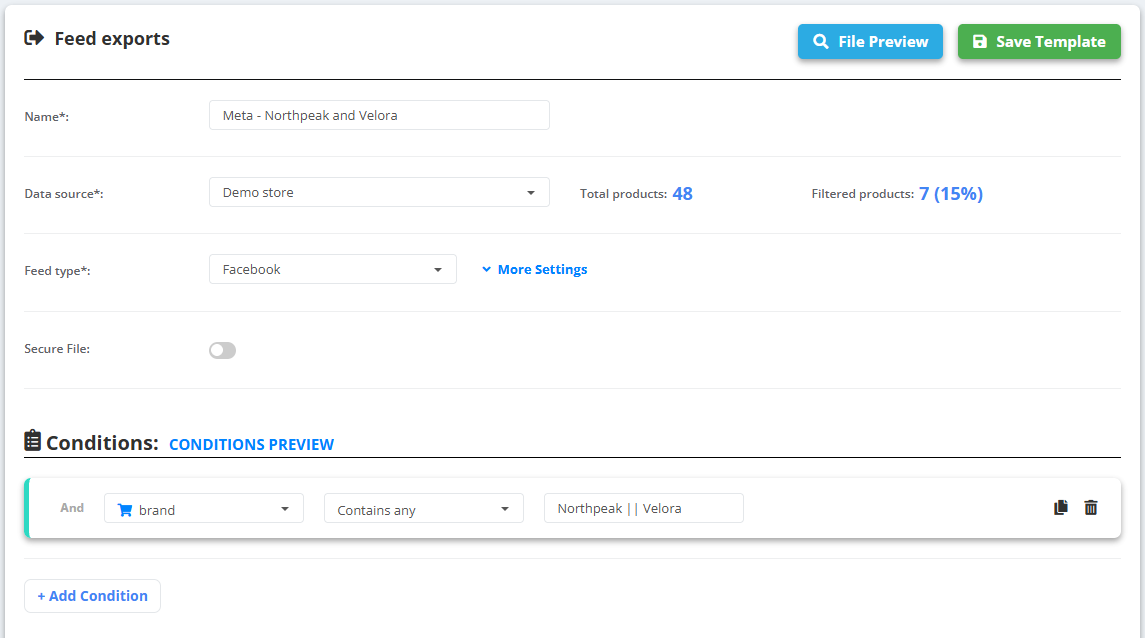
Example
- Data source: 48 products from 8 brands.
- Meta export with brand Contains any
Northpeak || Velora: 7 products (15%).
Use Does not contains any or Does not contains for the opposite - everything except one brand or category. These operators look for a part of the value, upper and lower case do not matter. More: Create a feed export.