
Budget Pacing (marked BETA in the menu) opens Custom Management & Pacing. It answers one question per account: is the spend on track for the budget? It is meant for anyone who has to hit a monthly or campaign budget across several Google Ads accounts.
What you see for each account
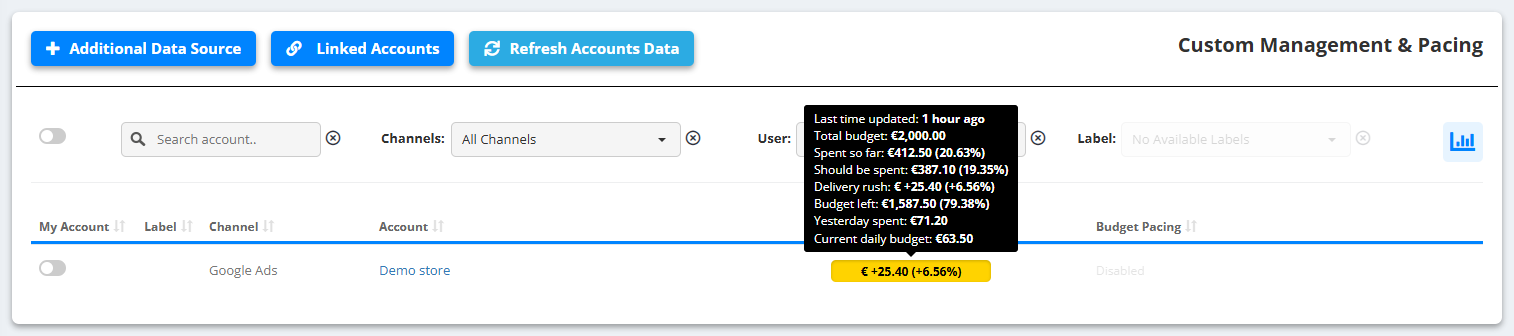
The figure in the account row shows how far the spend is ahead of or behind the plan; hover it for the details:
- Total budget
- Spent so far
- Should be spent
- Delivery rush - how much more (or less) was spent than planned by today
- Budget left
- Yesterday spent
- Current daily budget
First steps
- Open Budget Pacing in the left menu.
- Click Link Google Ads Accounts, tick the accounts under Not Linked Accounts and click LINK SELECTED ACCOUNTS.
- The linked accounts appear in the list with their budget figures. To remove some, use UNLINK SELECTED ACCOUNTS.
- Already set budgets in the Optimization Tool? Migrate Settings from Optimization brings them over.
Budget rules per account live in the Optimization Tool.