
- Go to Integrations (Manage Google Accounts).
- Open the tab of the login type - Google Ads Logins, Google Merchant Center Logins, Google Analytics Logins or Google Drive Logins - click + ADD NEW GOOGLE ADS LOGIN (or the button of that tab) and sign in with the Google account that has access.
- For Google Ads: the accounts visible to that login appear under Not Linked Accounts. Tick the ones you want and click LINK SELECTED ACCOUNTS. An MCC login brings all its client accounts.
- Unlink an account or a whole login any time with Unlink.
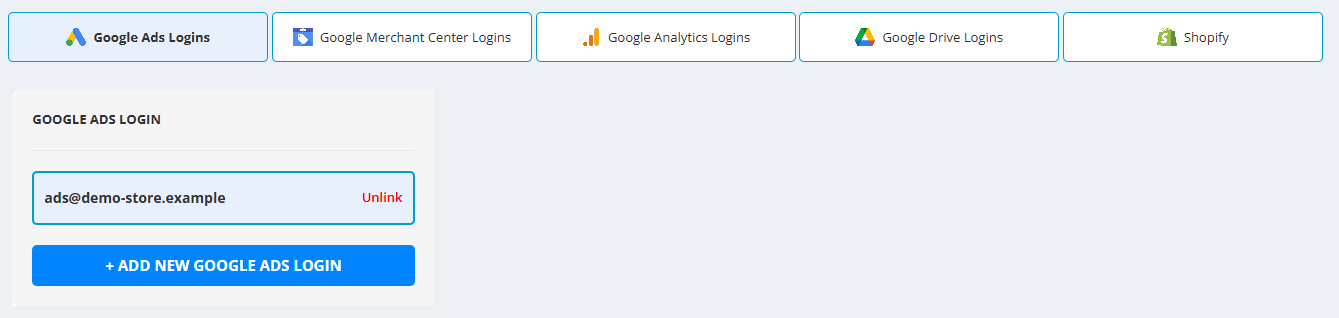
Which login is needed for what
- Google Ads - campaign builders, Free Features, the Shopping Product Report source, Shopping Labels performance data.
- Merchant Center - the Merchant Center and Price Benchmarks sources, Shopping campaigns, Shopping Labels, API connections.
- Google Analytics - GA4 data on products and in Shopping Labels.
- Google Drive - Google Sheets sources and Sheets data in Shopping Labels.
If it does not work
- “No accounts returned.” - the Google login has a problem, or all accounts of this login are already linked. Linked accounts no longer appear under Not Linked Accounts.
- An account is missing from the list - the Google account you signed in with has no access to it. Add a login with the Google account that has access (+ ADD NEW GOOGLE ADS LOGIN); an MCC login brings all its client accounts.