
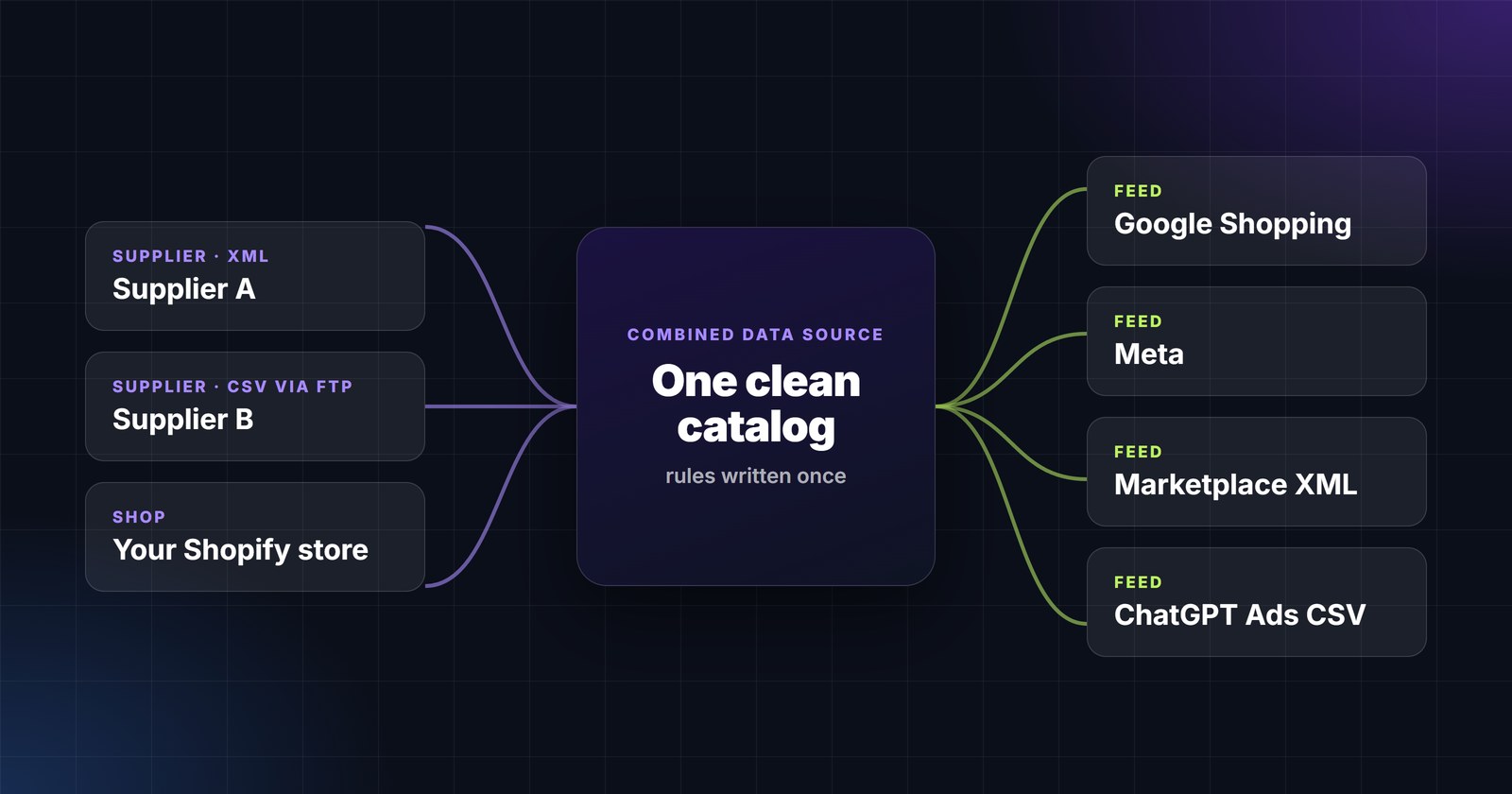
Ask an e-commerce manager how many product feeds the store has and watch them count on their fingers: Google Shopping, Meta, TikTok, Criteo, two marketplaces, a price comparison site, an affiliate network, a Google Sheet for the agency. Then the other direction: three suppliers sending XML, one sending CSV over FTP, one whose "feed" is a weekly email attachment. Fifteen to twenty files, each with its own structure, field names, rules and schedule - and each one, historically, a ticket for a developer.
This article describes the model that makes that manageable by one person, and how PPCDATAFEED implements it.
Why feeds multiply
- Every channel has its own specification. Google wants
g:-prefixed XML or TSV withimage_link; Meta wants its own field set; a marketplace wants a category ID from its own taxonomy; a comparison site wants a flat CSV with delivery costs per country. The same product is described five different ways. - Every channel wants a different subset. The whole catalog to Google, bestsellers only to a paid social channel, one brand to a brand-store marketplace, nothing under a margin threshold to affiliates.
- Suppliers do not care about your channels. Their feeds arrive in their structure, their currency, their availability words ("yes", "1", "auf Lager"), sometimes with your prices missing.
- Everything changes. Prices hourly, stock constantly, specifications every year - Google’s image rules, ChatGPT’s new feed, a marketplace’s new mandatory field.
When each feed is a separate script, every change is multiplied by the number of feeds. That is why "add TikTok" becomes a two-week project.
The model: sources in, one catalog, many exports out
The fix is architectural, not heroic. Separate the three jobs that a homemade feed script does at once:
- Ingest every source as it is - XML, CSV, JSON, FTP, a Shopify or WooCommerce store, a Google Sheet, Merchant Center itself - without reformatting it first.
- Normalise once into a single internal schema: map each source’s columns to the same field names, convert currencies, unify availability words, fix titles, assign categories, join supplier and performance data. Every rule is written once and applies to the catalog, not to a feed.
- Export many times from that catalog: each feed with the structure, field names, filters and schedule its channel wants, generated automatically and served at a stable URL the channel fetches.
Adding a channel becomes a mapping exercise on top of clean data. Changing a title rule changes every feed at the next update. A new supplier is one more source into the same catalog.
Inbound: supplier feeds and the "combined" catalog
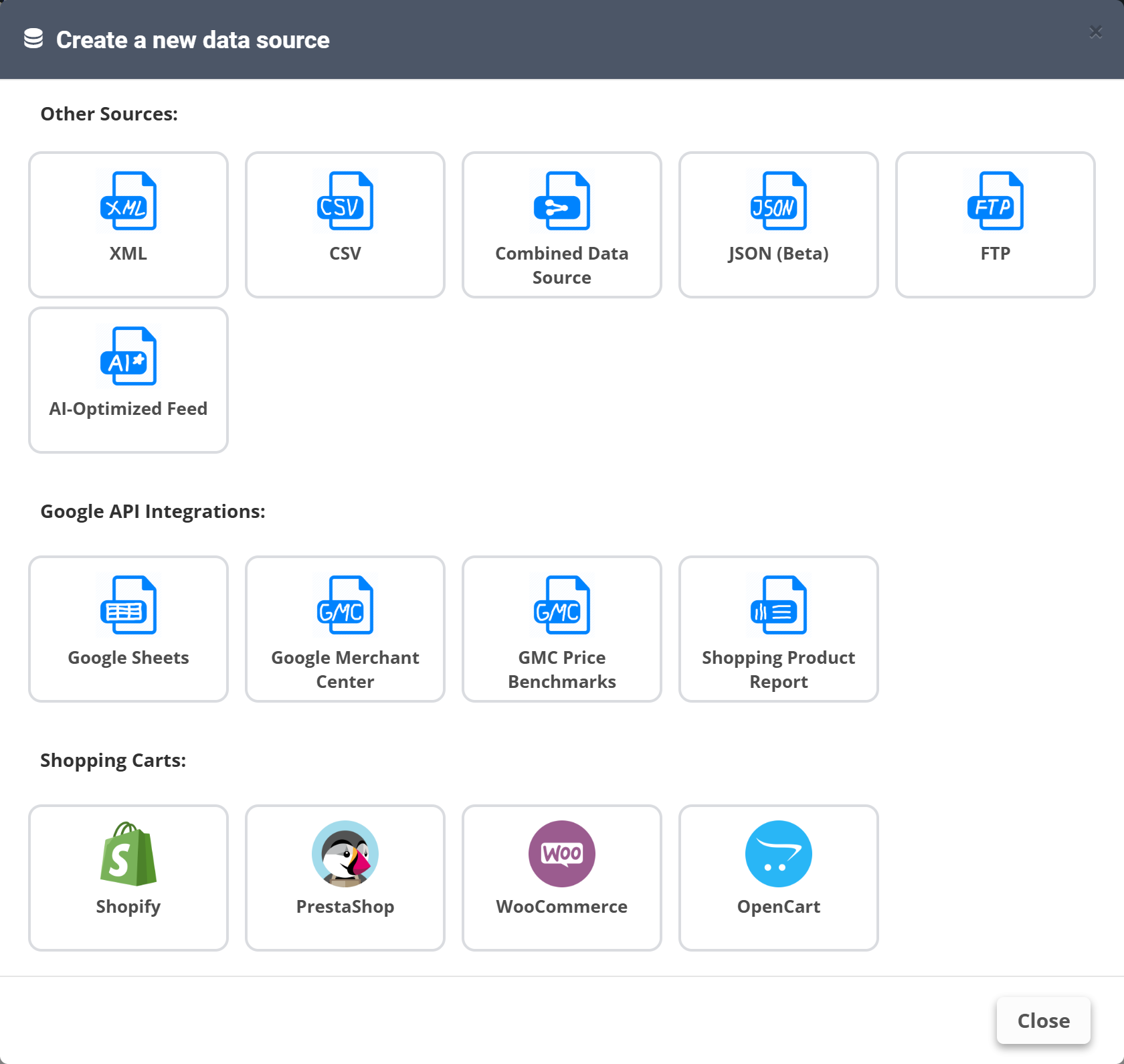
In PPCDATAFEED every inbound file or connection is a data source. A supplier’s XML behind a password, a CSV on FTP in Windows-1250 encoding, a JSON API, your own Shopify store - each becomes a source with its own mapping and schedule. The interesting part is what happens next:
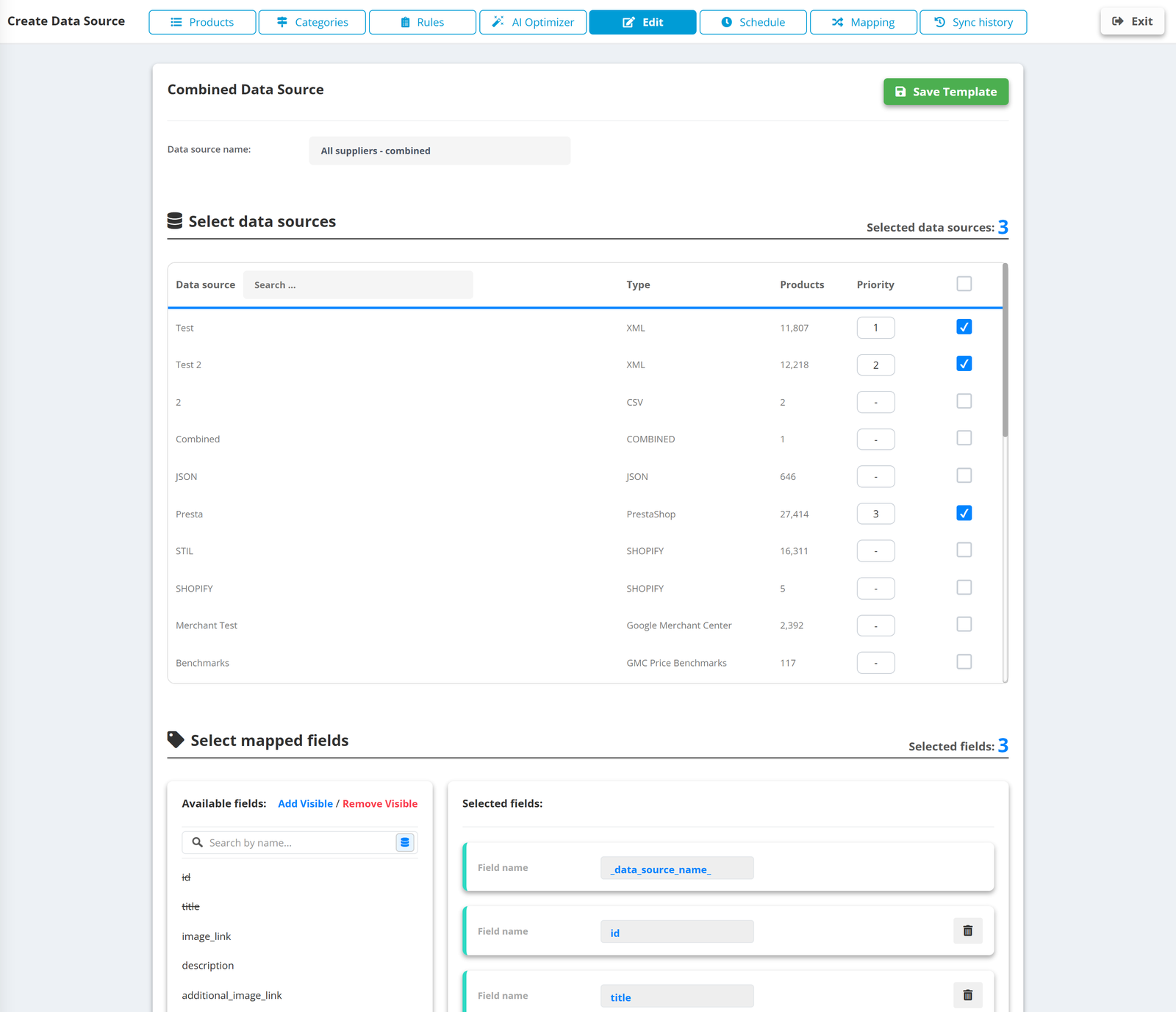
- Combined Data Source merges several sources into one catalog with a priority order - when two suppliers carry the same product, the higher-priority one wins on price and stock. A
_data_source_name_field tells every downstream rule and export where each product came from. - Mapping aligns supplier columns to your field names, so
Preis,price_eurandunit_priceall becomeprice. - Rules do the supplier-specific clean-up: currency conversion at the official daily rate, availability words to
in_stock/out_of_stock, your margin applied on top of the supplier price, listing codes stripped from titles. - Google Sheets as a source is the manager’s escape hatch - margins, seasonal flags or blocked SKUs maintained in a sheet and joined to the catalog by ID.
Outbound: a feed per channel from the same catalog
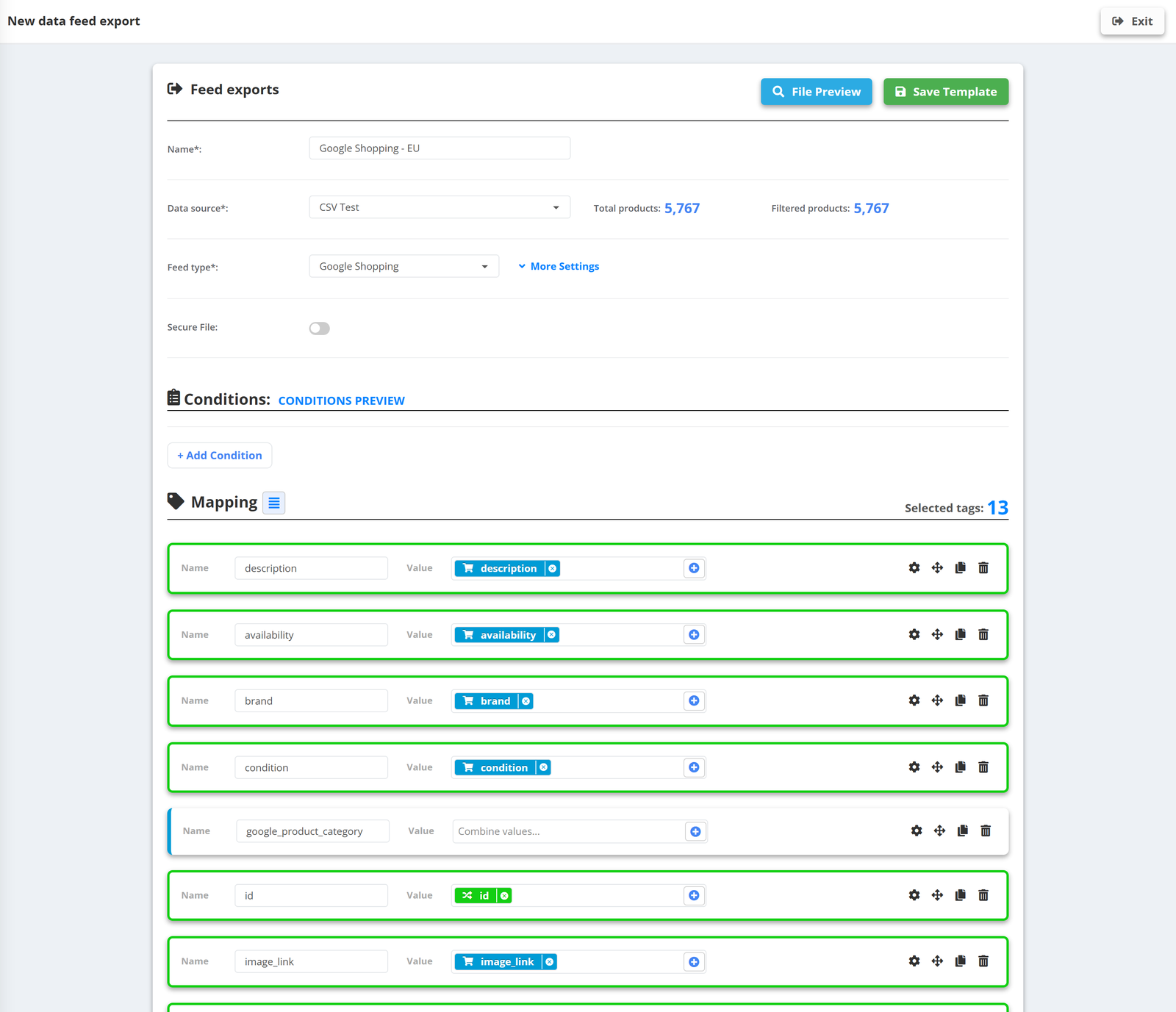
- Presets for the channels with fixed structures - Google Shopping, Google Custom and Page feeds, Facebook, Criteo - pre-fill the required fields and mark what is mandatory, recommended and optional.
- Custom XML and CSV for everything else: you name the root and product elements, the fields and their order, choose whether to prefix
g:, keep multi-line values, wrap in CDATA, and protect the file with a username and password when the receiver supports it. Any marketplace, comparison site or affiliate spec can be matched exactly - including the new CSV feed for ChatGPT Ads. - Conditions per export decide the subset: in stock only, one brand, margin above a threshold, products with a performance label.
- Field rules per export let the same product carry a different title or image per channel - the clean photo for Google, the branded creative for Meta.
- Delivery by URL. Every export has a stable link the channel fetches on its schedule; updates are atomic, so the link never serves a half-written or empty file. Check files usage shows which links are actually being fetched.
A worked example
A sports retailer with three suppliers and its own warehouse stock, advertising in two countries:
- Sources (5): Shopify store; supplier A XML (EUR); supplier B CSV over FTP (PLN, weekly); supplier C JSON API; a Google Sheet with margins and blocked SKUs.
- Catalog (1): Combined Data Source - warehouse stock has priority, then A, then B, then C. Rules: PLN → EUR daily; margin from the sheet applied to supplier prices; availability unified; titles rebuilt from brand, model, type, colour, size; Google categories mapped once; products with margin under 12 % or on the blocked list excluded.
- Exports (8): Google Shopping EUR (all in-stock products); Google Shopping for the second country (converted prices, translated titles from AI rules); Meta (bestsellers by label, creative image); TikTok (custom XML); Criteo; a comparison site CSV with delivery costs; a marketplace XML with its category IDs; a ChatGPT Ads CSV with
custom_labeltiers. - Schedule: sources hourly, the weekly supplier daily, everything downstream regenerated after each source update.
What used to be eight scripts and four supplier parsers is one catalog with about thirty rules. When supplier B changes its column names, one mapping changes. When a channel adds a mandatory field, one export changes. When the retailer adds Bing Ads, it is a preset and a URL.
Governance: keeping twenty feeds understandable
- Labels on data sources (client, supplier, market) so the list stays readable at 30+ sources.
- Sync history per source and per export - who ran when, with what result - the first place to look when a product count changes.
- Team access with owners and managers; agencies switch between client accounts from one login.
- Previews everywhere - rules show the exact products they change, exports show the first 100 rows of the file - so changes are checked before they reach a channel, not after.
The store did not choose to have twenty feeds; the market gave them to it. The choice it does have is whether each one is a separate piece of software or a view of one clean catalog. The second option is the only one that still works at feed number twenty-one.