
For fifteen years "shopping ads" meant two places: Google and Meta. In 2026 a third one appeared. OpenAI began testing ads in ChatGPT in February, opened a self-serve Ads Manager and CPC bidding in May, and in the following weeks added product feed campaigns - ads generated automatically from a retailer’s catalog file. If you already run Google Shopping, most of the work is done. This article explains what the feed is, how the campaigns behave, where they differ from Meta, and how to prepare the file without touching your developers.
Everything below about ChatGPT comes from OpenAI’s own documentation, linked inline. The platform is in beta and changes quickly - where something may have moved, we say so.
What ChatGPT product feed ads are
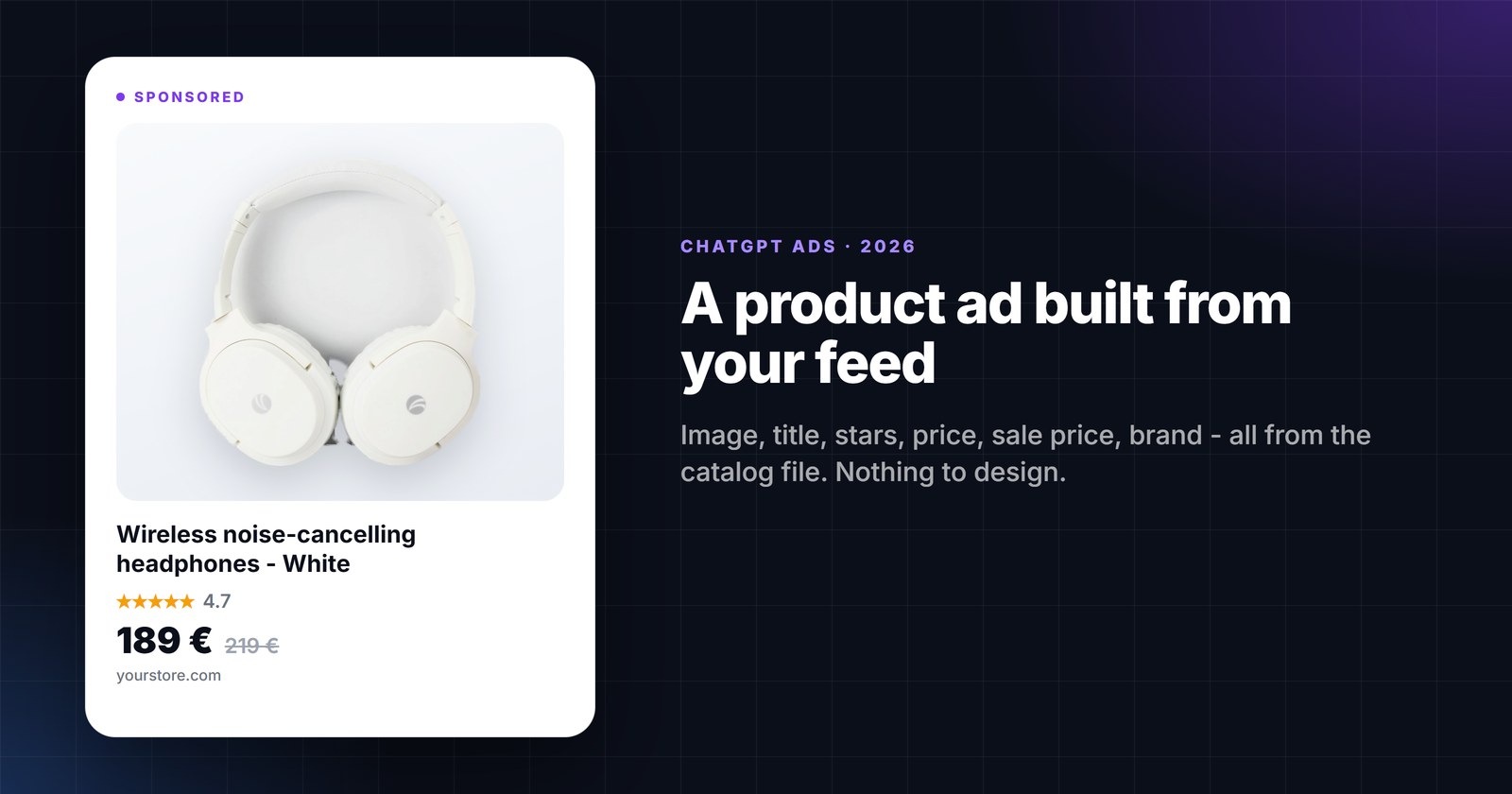
A product feed campaign is an ad campaign whose creatives are not designed by hand. You upload a structured file of your catalog - item IDs, titles, descriptions, prices, availability, images, URLs - into Ads Manager, choose which products an ad group may use, and ChatGPT assembles the ads from that data. According to OpenAI’s Help Center, product ads "use formats designed specifically for showcasing items from your catalog, featuring details such as product images, titles, stars, prices, sales prices, and your brand" (OpenAI Help Center).
Ads appear as clearly labelled sponsored units, separate from the answer itself. OpenAI states its ads principles as "ChatGPT’s answers stay independent, conversations stay private, and users remain in control" and that advertisers get aggregated insights "without access to individual conversations" (OpenAI, May 5, 2026). Campaigns can be bought on a CPM or CPC basis; feed-based ad groups default to a Maximize results bid strategy that adjusts bids toward clicks or conversions within your budget.
One important beta limitation: products from an advertising feed are not used in organic ChatGPT shopping answers. OpenAI writes that products "will only be eligible for use in ads during this beta. They will not appear in organic ChatGPT conversations, though we may offer that capability in the future" (OpenAI Help Center). Organic product recommendations are a separate merchant program with its own feed submission.
How a feed becomes a campaign - step by step
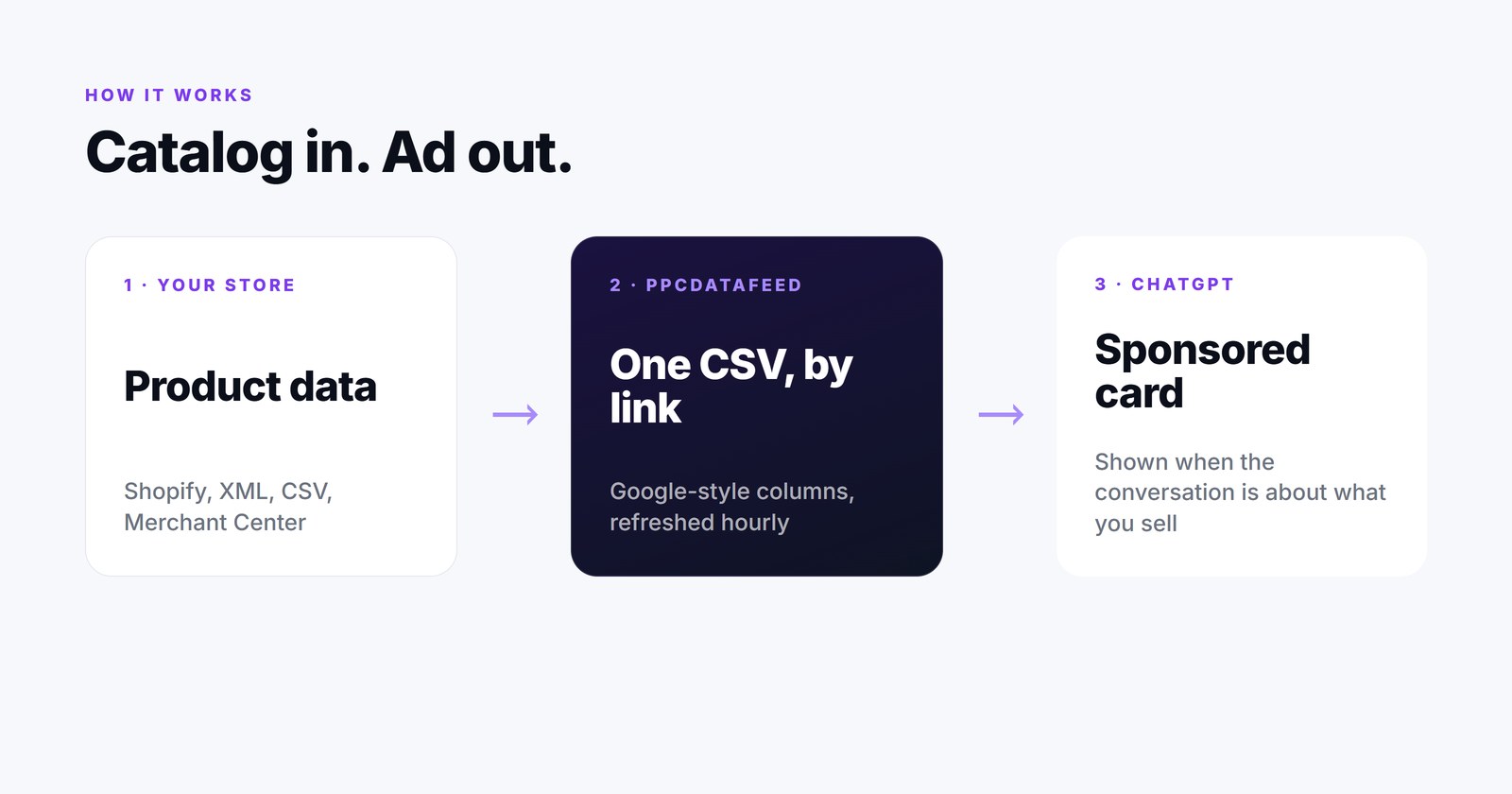
- Create a feed. In Ads Manager go to Tools → Feeds → Create Feed.
- Import products. Three ways: upload a CSV or TXT by hand, point Ads Manager at a Hosted URL (a stable HTTPS address it fetches itself), or push files over SFTP. OpenAI notes that items expire after two weeks, so a hosted URL or automated SFTP is recommended over manual uploads.
- Wait for validation. Processing takes minutes to hours depending on size; Upload History shows errors.
- Create a campaign and pick the campaign type Product feed.
- Create an ad group and filter products. Choose the feed, apply product filters, and check the product count. If the built-in filters are not enough, OpenAI suggests adding your own values in the feed (for example a bidding tier or product line) and filtering on those.
- Create an ad template. Currently the template lets you choose only the image field; titles and descriptions come straight from the feed. Review the sample preview.
- Review and launch. Confirm feed, product count, titles, images, landing pages, budget and targeting, then submit for review.
Source for all seven steps: Create Campaigns from Product Feeds in the OpenAI Help Center.
The catalog: what the file must contain
OpenAI publishes two flavours of the spec. Its native format uses fields such as item_id, url and image_url. The second flavour is a Google-compatible feed: "Upload a UTF-8, tab-delimited .txt or .tsv file, or a comma-delimited .csv file", with "lowercase, underscore-separated column names" (OpenAI feed spec). That is the path most stores will take, because it is the file they already send to Merchant Center.
Required columns (Google-compatible feed)
id- a stable, unique identifier per varianttitle- up to about 150 charactersdescription- factual, up to about 5,000 characterslink- the product pageimage_link- a direct JPEG or PNG URL, publicly accessibleavailability-in_stock,out_of_stock,preorderorbackorder(note:preorderwithout an underscore;unknownis not accepted)price- amount and currency, for example79.99 EURbrand
Optional columns worth filling
sale_price- must be strictly lower thanprice; sale prices are shown in the ad formatgtin,mpn,condition,google_product_category,product_typeitem_group_idpluscolor,size,material,gender,age_group- variantsadditional_image_linkcustom_label_0…custom_label_4- the columns Ads Manager uses as ad filters. Put your grouping logic here: margin tier, bestseller, season, product line.
Two things catch Google Shopping veterans out. First, the ChatGPT spec does not acceptg:-prefixed XML - it wants CSV or TSV. Second, the availability values differ slightly from Google’s (preorder, and nounknown). Both are one export setting away, see below.
How it differs from Meta catalog ads
Both are "give us your catalog, we build the ads" products, and the same file can feed both. The differences are in what triggers the ad and what you control.
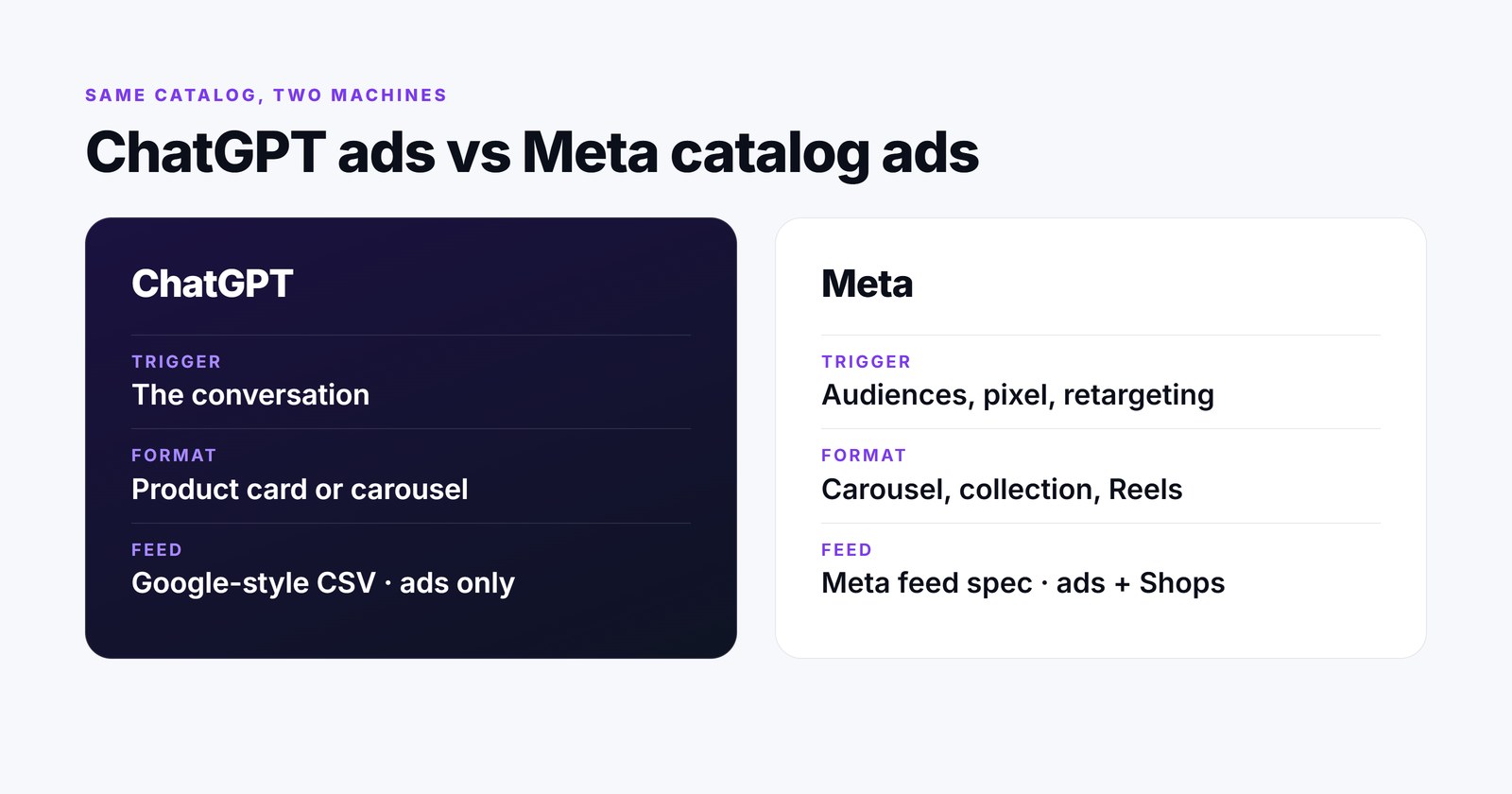
- What triggers the ad. In ChatGPT the trigger is the conversation - someone is learning about a category, comparing options or deciding, and a relevant product card appears below the answer. Meta’s Advantage+ catalog ads are driven by audience signals: pixel and app events, retargeting of people who viewed or carted products, lookalikes and broad targeting.
- Format. ChatGPT: a sponsored product unit assembled from image, title, price, sale price, stars and brand - a single product card or, since August 2026, a carousel of several products from one retailer, with ChatGPT deciding which to show (Digiday, Aug 6, 2026). Meta: carousel, collection and single-image formats across Facebook, Instagram, Reels and Stories, with catalog-wide image templates and frames.
- Creative control. In ChatGPT the ad template today lets you pick only the image field - the rest is the feed. Meta gives you image templates, price overlays, catalog-level cropping rules and Advantage+ creative variations.
- Feed spec. ChatGPT accepts a Google-style CSV/TSV (or its own JSONL/CSV/TSV/Parquet format). Meta has its own data feed specification with different field names and values.
- Freshness. ChatGPT items expire after two weeks unless refreshed; OpenAI recommends at least daily full snapshots. Meta refreshes on the schedule you set for the data feed.
- Organic tie-in. Meta catalogs power Shops as well as ads. ChatGPT advertising feeds, in this beta, power ads only.
Getting your feed ready with PPCDATAFEED
If your products already live in PPCDATAFEED as a data source, the whole preparation is one export and a few rules. Nothing about it requires a developer.
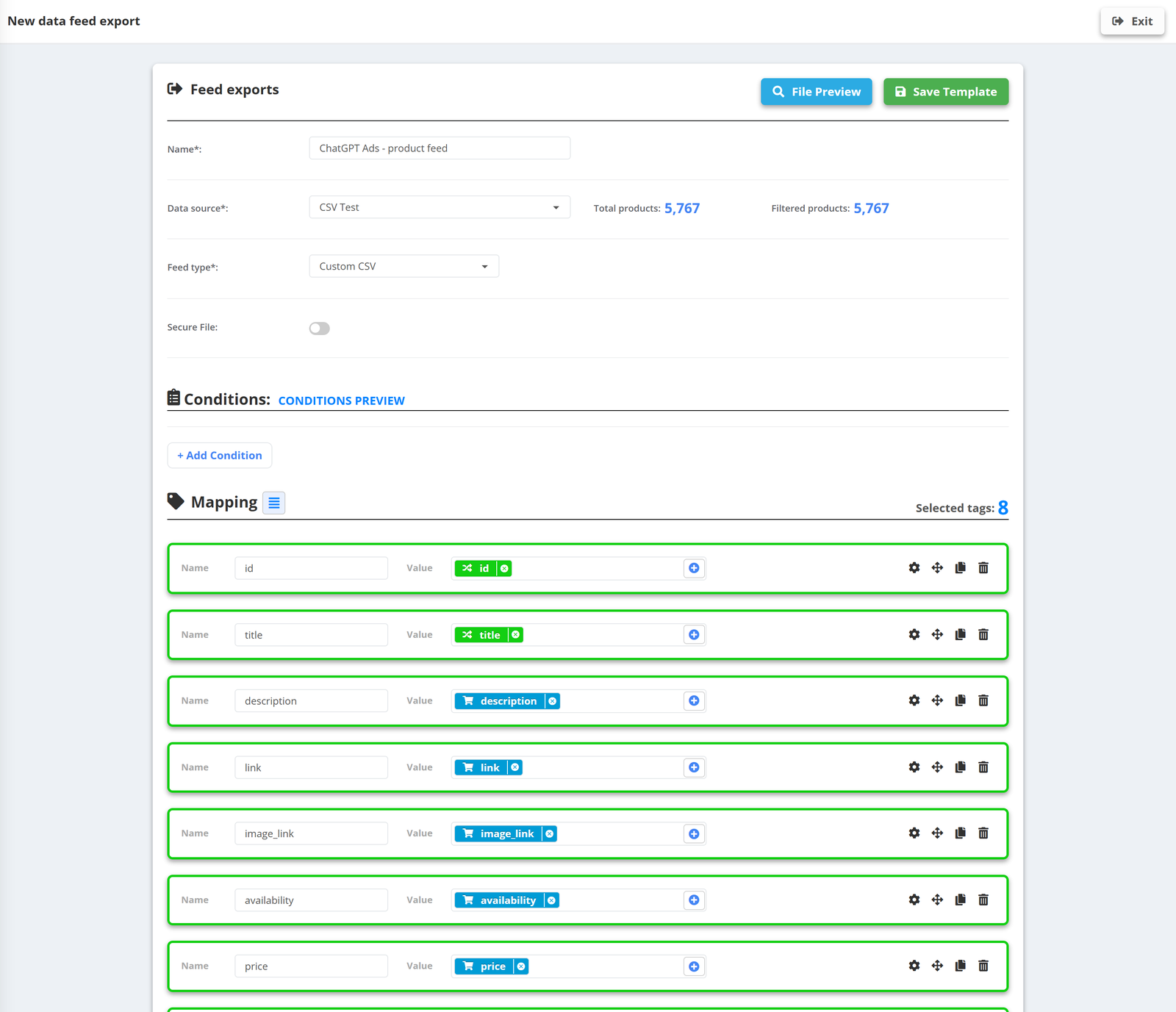
- Start from the data source you already use for Google Shopping - the titles, categories, GTINs and availability rules you wrote for Google are exactly what ChatGPT wants.
- Create a new feed export and choose Custom CSV. Map the required columns with the exact names above:
id,title,description,link,image_link,availability,price,brand, then the optional ones you have. A dedicated ChatGPT Ads preset is being added to the app; until it ships, the custom export takes five minutes. - Fix the availability values with a rule -
in stock→in_stock,preorderspelled without an underscore, and map anything unknown toout_of_stockso the row is not rejected. - Fill `custom_label_0-4` with your grouping logic - by rule (margin band from price and cost, season from a date rule, product line from category) or from performance data with Shopping Labels (best sellers, high ROAS, no-sales). These become the filters of your ad groups.
- Add conditions so only advertisable products go out: in stock, with an image, with a price, not on your exclusion list.
- Copy the feed URL and paste it into Ads Manager as a Hosted URL. Set the data source to update hourly - OpenAI’s two-week expiry never comes near, and price or stock changes reach the ads within the hour.
Because every export in PPCDATAFEED is its own file with its own filters, the ChatGPT feed can differ from the Google one - a smaller set of products, a different image field, a different title rule - while both are generated from the same catalog on the same schedule.
A checklist before you launch
- Every required column present, names lowercase with underscores, file is CSV or TSV, not XML
- Titles under 150 characters with brand, product type and the key attribute in the first 70
- Availability values exactly
in_stock/out_of_stock/preorder/backorder - Prices with currency;
sale_pricestrictly belowprice - Image URLs public, JPEG or PNG, showing the exact variant
custom_labelcolumns filled with the groups you want to bid on differently- Hosted URL refreshed at least daily - hourly is better
- Product count in Ads Manager matches what your filters should produce
ChatGPT will not replace Google or Meta for most stores this year. But it is the first new shopping placement in a long time where the entry ticket is simply a clean, complete catalog file - and that is a ticket most stores can print today.
Sources
- Create Campaigns from Product Feeds - OpenAI Help Center
- Product feed specification (Agentic Commerce) - OpenAI Developers
- New ways to buy ChatGPT ads - OpenAI, May 5, 2026
- Product image specifications for catalogs - Meta Business Help Center
- OpenAI brings product carousels to ChatGPT ads - Digiday, Aug 6, 2026